Description
To address this anti-pattern within the EA domain, it is necessary to understand how concurrent processes arise in ArchiMate. Such a scenario may occur when a process flow is divided by an AND Junction, resulting in multiple concurrent processes. If these processes access the same data source, they may do so simultaneously, resulting in inconsistent data. Data elements retrieves an outdated value due to data synchronisation problems with other elements in the process.
Context
Derived from: “Inconsistent Data” BPM anti-pattern
Cause
A single responsibility has been split up among a large number of classes. This can happen after overzealous reduction of Multifaceted Abstraction. All was well as long as the structure stayed small. But with new components being added, making changes has become harder and harder.
Consequences
Elements will retrieve the wrong data value from an data element
Detection
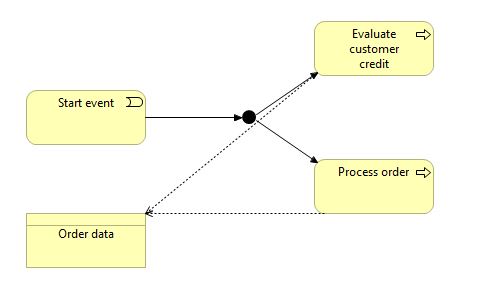
A concurrent process may arise in the ArchiMate when a process flow is split by an “AND” Junction, then the process is branched in two or more flows that run simultaneously. If those processes that have driven from the same branch access the same data source, this could mean they have simultaneous access to data, and this may lead to inconsistency of data.
Solution
Move existing behaviors into a single component. If there’s no component appropriate for this, create a new one. If moving code to the same element leaves the original one almost empty, try to get rid of these now-redundant components.
Example
The “Start event” element initiates a concurrent process. The “Process order” and “Evaluate customer credit” elements operate simultaneously and access the same data source, “Order data.” Consequently, data consistency cannot be ensured, and any modifications made by one element may remain unnoticed by the other.
Cypher query
MATCH (startNode:Junction {type: 'and'}) <br /> MATCH (endNode:BusinessObject|DataObject) <br /> CALL apoc.path.expandConfig(startNode,{relationshipFilter:"AccessRelationship>|TriggeringRelationship>|FlowRelationship>|AssociationRelationship>", <br /> minLevel: $minLevel, <br /> maxLevel: $maxLevel, <br /> terminatorNodes:[endNode] <br /> }) <br /> YIELD path AS p <br /> RETURN pCypher count query
MATCH (startNode:Junction {type: 'and'}) MATCH (endNode:BusinessObject|DataObject) CALL apoc.path.expandConfig(startNode,{relationshipFilter:"AccessRelationship>|TriggeringRelationship>|FlowRelationship>|AssociationRelationship>", minLevel: $minLevel, maxLevel: $maxLevel, terminatorNodes:[endNode] <br /> }) YIELD path AS p RETURN COUNT (DISTINCT endNode)Diagram
Tags
Process, Data-flow related defects
Query parameters
[
    {
        "name": "minLevel",
        "type": "number",
        "default": 2,
        "description": "The minimum length of the path for detection."
    },
    {
        "name": "maxLevel",
        "type": "number",
        "default": 5,
        "description": "The maximum length of the path for detection."
    }
]